When buyers ask AI agents for software recommendations, discovery skips traditional search result pages. Buyers interact with models like ChatGPT, Claude, and Perplexity in multi-turn conversations, evaluating synthesized comparisons before clicking citation links.
Standard analytics tools capture only a fraction of this journey. Google Analytics 4 blends AI visits into general referral tables, Google Search Console isolates impressions without clicks, and zero-click recommendations hide behind direct visits. Analysing traffic from AI agents requires measuring visible downstream referrals alongside upstream brand mentions across models.
In short
- AI agents pass identifiable referral signatures. GA4 isolates ChatGPT, Claude, and Perplexity visits through regex filters and custom channel groups.
- Search Console Generative AI reports measure impressions only. The report shows which URLs appear in AI Overviews and AI Mode, but omits clicks, queries, and click-through rates.
- Google Discover is not an AI traffic report. Discover is an algorithmic content feed based on user interests, not a conversational search engine.
- Traditional analytics miss zero-click discovery. GA4 and Search Console cannot reveal user prompts, competitor mentions, third-party citation sources, or brand sentiment.
- Complete analysis requires tracking upstream visibility. Independent platforms like Lumirank monitor daily prompt presence, brand prominence, and citations before the click occurs.
What Google Search Console Tells You About AI Traffic #
In June 2026, Google introduced dedicated Generative AI performance reports in Google Search Console, completing a global rollout by August 2026. These reports give website owners an isolated view of how their content appears within Google’s generative search experiences.
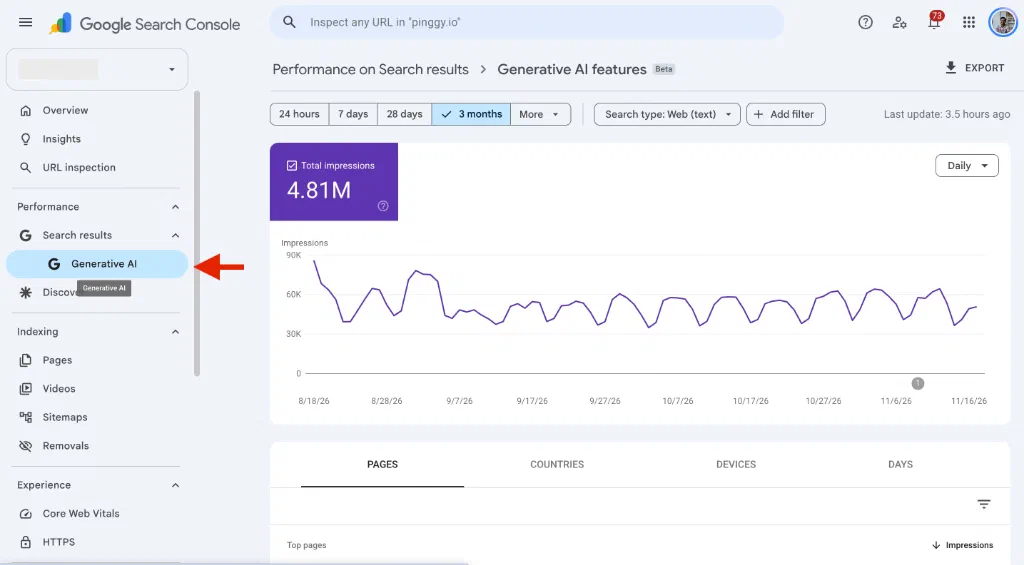
The reporting suite includes two views under the Performance sidebar in Search Console:
- Generative AI (Search): Covers citations and link cards rendered inside AI Overviews and Google AI Mode.
- Generative AI (Discover): Covers link appearances inside generative AI blocks within Google Discover feeds.
What the report measures and omits #
The report strictly measures impressions. An impression registers when a URL citation card renders into the user’s viewport inside an AI Overview or AI Mode block. You can filter these impressions across pages, countries, devices, and dates.
As highlighted in the real Search Console dashboard above, Google displays only Total impressions (4.81M impressions in this 3-month view for Pinggy). The dashboard contains no metric cards for total clicks, click-through rates (CTR), or average position. Crucially, it also omits the user search queries or prompts that triggered the generative answer.
Clicks originating from AI Overviews and AI Mode remain aggregated directly inside the standard Search performance report alongside regular organic clicks. Google provides no seperate filter in web performance to isolate clicks coming from generative modules versus traditional organic blue links.
Clarifying Google Discover #
Many marketing teams confuse the Discover reporting option in Search Console with AI search analytics. That assumption is incorrect.
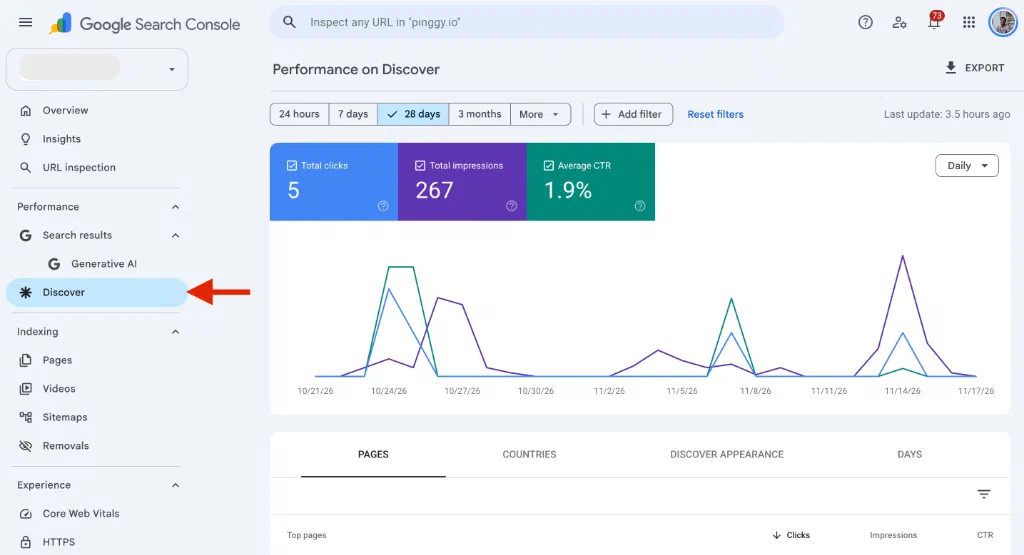
Google Discover is a personalized recommendation feed based on browsing history, location, and followed topics from Google’s Knowledge Graph. It does not answer buyer questions, execute conversational reasoning, or ground answers via Retrieval-Augmented Generation (RAG).
As shown in the Discover report above, the interface displays standard push metrics: Total clicks (5), Total impressions (267), and Average CTR (1.9%). Discover pushes articles based on audience affinities rather than search queries. Traffic from Discover reflects content recommendations, not conversational AI research or agent-driven discovery.
To access the Generative AI report, your site must reach a minimum threshold of impressions in supported features. Site owners can also use the Search generative AI control setting under Settings > Search generative AI to opt out of inclusion, removing URLs from AI-generated text features without penalizing standard organic rankings.
Tracking AI Agent Referrals in Google Analytics 4 #
When buyers follow citation links from standalone AI assistants, those visits register in Google Analytics 4 as referral traffic.
Consider Marcus, evaluating cloud practice management software for a multi-location dental clinic. Marcus asks Claude to compare platforms supporting automated recall and digital imaging. Claude recommends DentalFlow, highlights its pricing, and provides citation pills linking directly to DentalFlow’s product and integration pages. When Marcus clicks that citation, his browser passes an HTTP referrer header to DentalFlow’s analytics.
How AI platform referrers appear #
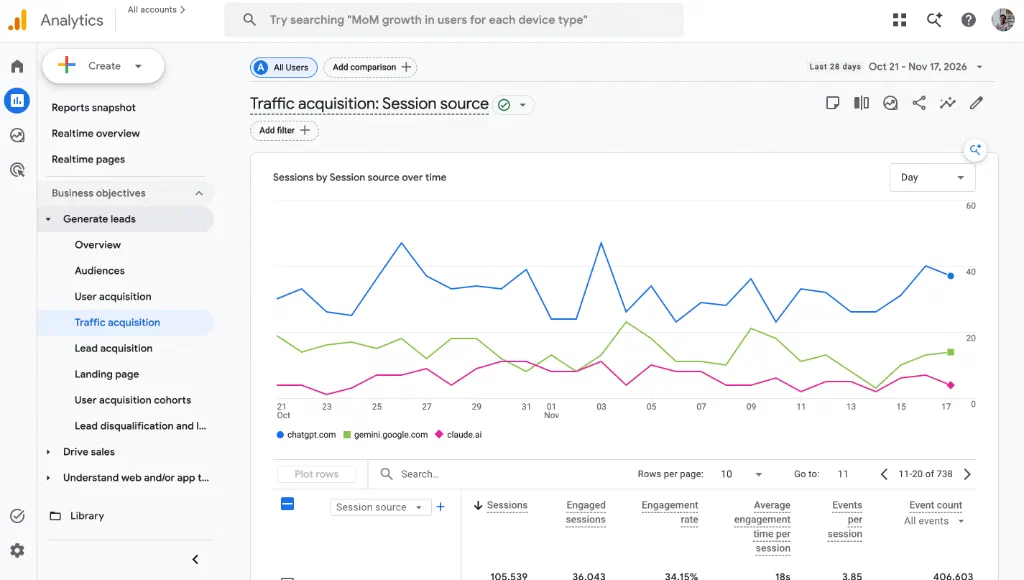
Desktop browsers pass recognizable hostnames in the Session source dimension:
chatgpt.com / referralclaude.ai / referralperplexity.ai / referralcopilot.microsoft.com / referralgemini.google.com / referral
Mobile app visits behave differently. Android apps frequently pass package schemes like android-app://com.openai.chatgpt / referral. On iOS, in-app browsers often strip referral headers entirely, causing visits to register as (direct) / (none).
Isolating AI traffic and tracking conversions #
To view all AI agent traffic in one place, open Reports -> Acquisition -> Traffic acquisition, set the primary dimension to Session source / medium, and filter using this regex:
chatgpt\.com|claude\.ai|perplexity\.ai|copilot\.microsoft\.com|gemini\.google\.com|android-app:\/\/com\.openai\.chatgpt
In Admin -> Data display -> Channel groups, build an AI Referral custom channel rule where Session medium equals referral and Session source matches the regex above.
AI visitors display unique behavioral patterns compared to traditional search visitors. In traditional search, users click an organic link early in their research, landing on broad educational guides. With AI agents, the model synthesizes answers directly in the prompt. By the time Marcus clicks a citation link, Claude has already verified his technical criteria. Marcus lands on /pricing or /integrations with high intent.
To track conversion efficiency, build a Free-form Exploration in Explore pairing Session source / medium and Landing page with Sessions, Engaged sessions, Average engagement time per session, Key events (demo_request or contact_sales), and Session key event rate. Across B2B software categories, referral sessions from ChatGPT and Claude frequently show 35% to 50% higher engagement times and substantially higher key event rates than general organic search.
The Limitations of Traditional Analytics #
Google Search Console and Google Analytics 4 measure downstream activity: users who see an impression on Google or arrive at your site. They leave marketers blind to upstream decision-making inside AI models:
- Prompt blindness: GA4 records that Marcus arrived from
claude.ai / referralon/integrations/dexis. It cannot tell you what question Marcus typed into Claude. Search Console is equally silent on queries in its Generative AI report. - Zero competitor context: Web analytics measure only your owned domain. If Claude presented DentalFlow alongside two competing platforms, traditional analytics cannot capture that context. You cannot tell whether your brand was recommended first or mentioned tenth.
- Blindness to citation sources: Generative engines use Retrieval-Augmented Generation to construct answers. As explored in traditional SEO vs GEO and AEO, models synthesize facts from third-party directories, forum discussions, and review roundups. GA4 cannot tell you which third-party websites the model read before recommending your product.
- No sentiment tracking: AI models do not simply list links; they synthesize reputations, pros, and cons. Neither Search Console nor GA4 can evaluate whether an AI model praised your uptime or cautioned users about complex setup.
- Dark AI traffic and zero-click discovery: In many interactions, buyers receive a complete answer inside the AI conversation and never click a citation immediately. Marcus reads the summary, takes note of DentalFlow, and visits three days later via direct navigation or branded organic search. GA4 credits the conversion to direct traffic, hiding the AI assist.
Measuring Upstream AI Visibility With Lumirank #
To see how AI models evaluate your brand before a click occurs, marketing teams use specialized AI visibility platforms.
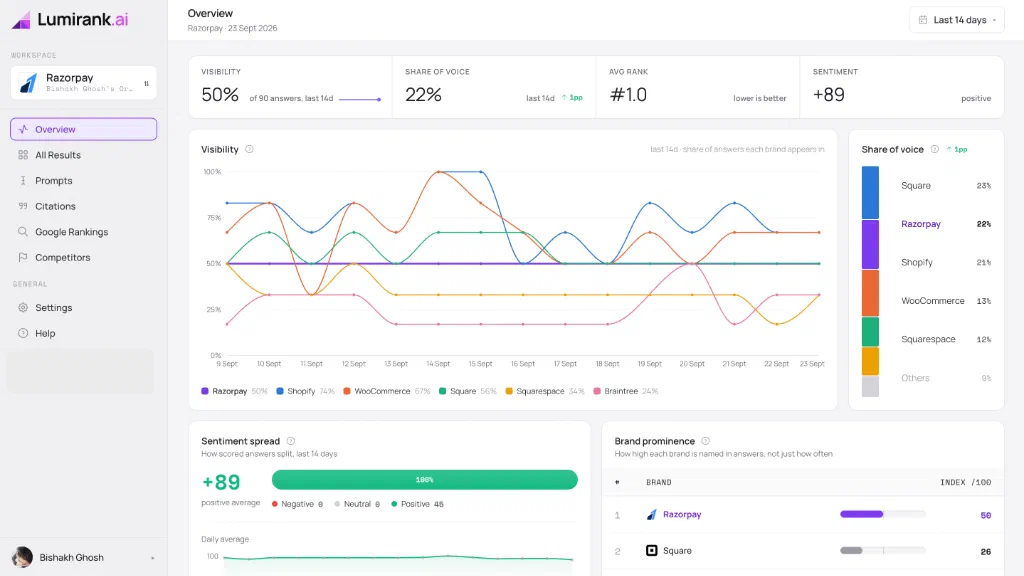
Independent platforms like Lumirank monitor how AI engines perceive, rank, and describe brands across category prompts. Instead of waiting for downstream referral hits, Lumirank probes models daily across six major AI platforms: ChatGPT, Google Gemini, Perplexity, Microsoft Copilot, Google AI Mode, and Google AI Overviews.
Key tracking capabilities include:
- Daily prompt tracking: Probing buyer queries across multiple target countries and models to measure consistency.
- Brand visibility score: The exact percentage of synthesized answers that name your brand over an honest denominator (0% to 100%).
- Brand prominence index: A 0 to 100 metric weighting where in the response your brand appears. Being listed first carries more weight than being listed tenth.
- Competitor analysis: Direct benchmarking against competitors, highlighting prompt gaps where rivals appear and your brand does not.
- Citation tracking: Mapping every page and domain a model leaned on to build its answer, split into owned, earned, and competitor sources.
- Sentiment analysis: A mention-weighted score from -100 to +100 per platform, backed by a positive, neutral, and negative sentiment breakdown.
In the dashboard shown above, Lumirank tracks 90 category answers for a payments provider, recording 50% visibility, 22% share of voice, and a #1.0 average rank with +89 sentiment against competitors like Square and Shopify. This upstream data reveals why referral traffic fluctuates in GA4.
A Practical Workflow to Analyse AI Traffic and Visibility #
Tracking AI discovery requires connecting downstream website metrics with upstream model behavior:
isolate GA4 AI referrals -> track GSC generative impressions -> audit conversion velocity -> monitor upstream prompts in Lumirank -> close third-party citation gaps
- Isolate AI platform referrers in GA4: Set up an AI Referral custom channel group matching hostnames for
chatgpt.com,claude.ai,perplexity.ai,copilot.microsoft.com, andgemini.google.com. Track monthly session volume, new users, and landing page distribution. - Monitor Search Console Generative AI impressions: Review the Generative AI performance report in Search Console monthly. Identify which URLs earn impressions inside AI Overviews and AI Mode, and confirm that core product and pricing pages maintain crawl eligibility.
- Audit conversion velocity and key events: Use a Free-form Exploration in GA4 to compare key event rates on AI referrals against standard organic search. Check whether AI referrals convert faster on high-intent pages such as pricing tables and demo requests.
- Track upstream prompt visibility and sentiment: Configure category prompts in Lumirank to monitor how often ChatGPT, Claude, and Perplexity recommend your product. Track your brand prominence index and sentiment score to spot drops in model favorability before downstream traffic falls.
- Close third-party citation gaps: Review citation reports to discover which independent review directories and publications AI models cite when recommending competitors. When rivals recieve citations from third-party sites your brand lacks, target those publications for inclusion to earn RAG consensus.
Next Steps for Your Analytics Setup #
Analysing traffic from AI agents requires accepting that discovery is split between the chat window and your website. Measuring only last-click referrals in Google Analytics 4 ignores the AI models that shape buyer shortlists long before anyone visits a page.
Begin by setting up an AI Referral channel group in GA4 and checking your impression baseline in Search Console’s Generative AI report. Then, pair those downstream metrics with upstream prompt tracking to ensure your brand remains visible wherever buyers ask for recommendations.