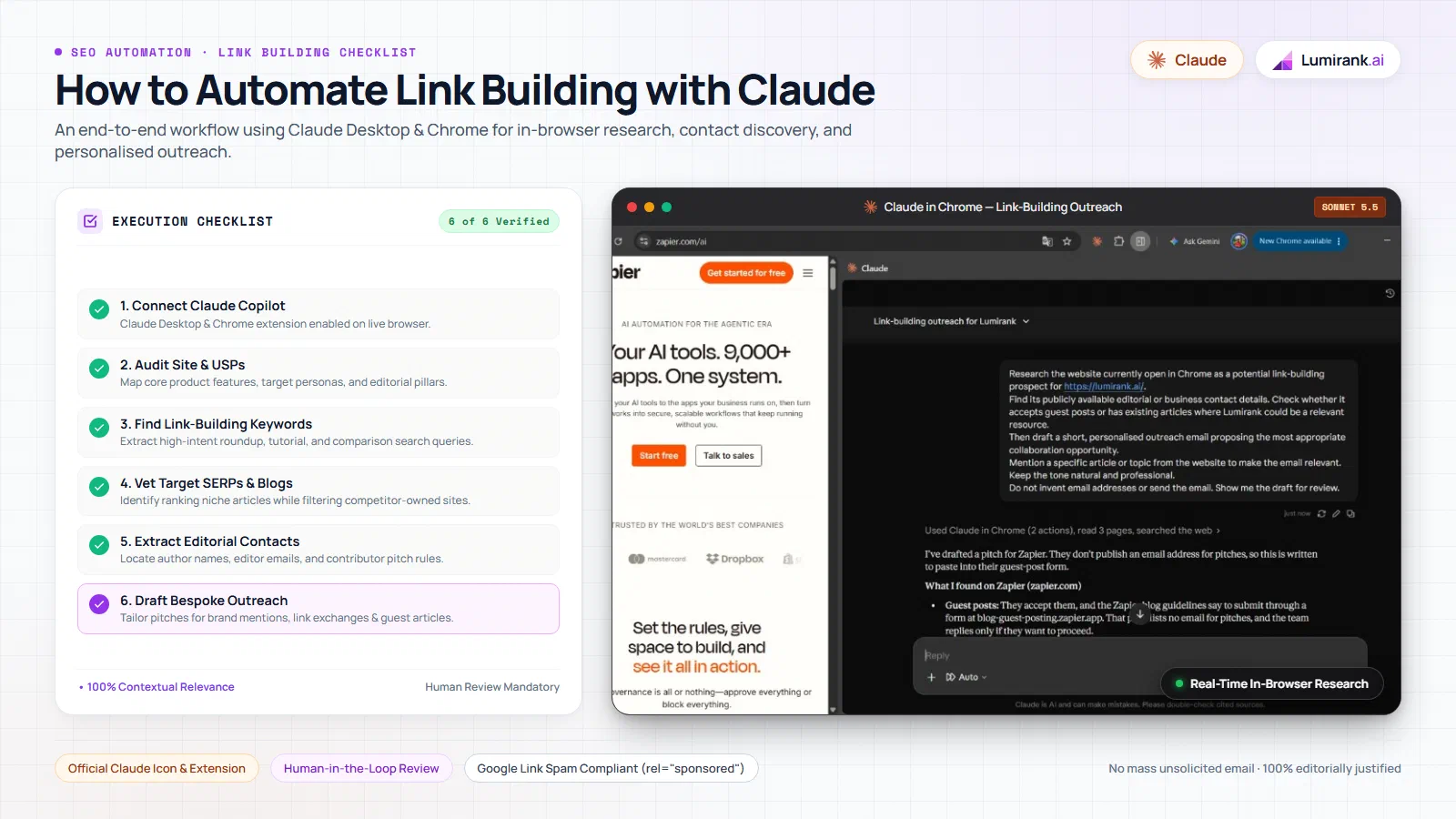
Link building has always been one of the most time-consuming parts of SEO. Traditional outreach often relies on database scrapers and mass email software that blast hundreds of generic messages. Those templates usually land in spam folders, annoy editors, and produce low response rates.
Instead of running impersonal blast campaigns, you can use Claude directly inside Google Chrome as an in-browser research copilot. Using the official Claude in Chrome extension, Claude reads active browser tabs, examines competing articles on Google, pulls public editorial contacts, and drafts tailored pitches while keeping you in full control.
In short
- Claude in Chrome acts as a live research copilot. The official extension inspects open web tabs directly, removing the need for third-party scraping scripts.
- Paid Claude plans include browser access. Claude in Chrome is available on Claude Pro, Max, Team, and Enterprise subscriptions.
- Every outreach email requires human approval. Claude drafts tailored pitches and extracts data, but you review each message and send it from your own inbox.
- Google link spam policies require clear qualification. Paid placements and commercial exchanges must carry rel=“sponsored” or rel=“nofollow” attributes to comply with Google guidelines.
- Contextual quality beats mass outreach. High-relevance editorial pitches that provide genuine reader value earn links, while automated cold blasts get flagged as spam.
Why browser-assisted link building works #
The core difference between traditional outreach software and browser-assisted link building comes down to context:
- Unattended mass outreach: Software pulls old contact lists from third-party databases, merges basic variables like company names, and dispatches automated sequences. Editors recognize these templates immediately and delete them.
- In-browser copilot research: You navigate the web naturally in Chrome. When you find an interesting article, Claude reads the live page in real time. It identifies the author’s exact arguments, notes missing resources, and drafts a pitch referencing specific paragraphs. You review the draft, refine the tone, and send it yourself.
To show how this works in practice, this guide examines a real-world test conducted on Lumirank, an AI search visibility platform, using Claude in Chrome to audit positioning, find ranking search results, and pitch independent publications like Zapier.
Step 1: Connect Claude to Chrome #
To use Claude inside your browser, you need to install the official extension from Anthropic.
- Verify your subscription: Browser integration is available on paid Claude plans, including Claude Pro, Max, Team, and Enterprise. Check your account tier on the official Anthropic pricing page.
- Install the extension: Open Google Chrome on your desktop and navigate to the Chrome Web Store. Search for Claude in Chrome and select Add to Chrome.
- Pin the extension: Click Chrome’s puzzle icon in the top toolbar and pin Claude so the icon remains accessible beside your address bar.
- Sign in and configure permissions: Click the Claude icon to open the Chrome side panel. Sign in with your paid credentials and grant the requested permissions so Claude can read the content of active browser tabs.
Claude in Chrome defaults to a manual approval mode. It inspects open tabs and suggests actions, but does not perform background modifications without your input. When the side panel displays “How can I help you today?”, your browser copilot is ready.
Step 2: Analyse your website #
Before looking for external websites, ask Claude to audit your own site. This establishes your core value proposition and clarifies which topics your content can credibly support.
Open your website in Chrome (for our test, https://lumirank.ai/pricing/), click the Claude side panel, and run this prompt:
Analyse https://lumirank.ai/ and understand its products, services, target audience and niche.
Based on the actual website, identify 15 high-intent keywords that potential customers might search for when looking for a solution like Lumirank.
Group the keywords by topic, such as AI visibility tracking, GEO, AI search monitoring, brand mentions and competitor analysis.
For each keyword, explain its relevance and suggest the type of blog or website that could be a potential backlink opportunity.
Present the results in a clear table. Use only information you can verify.
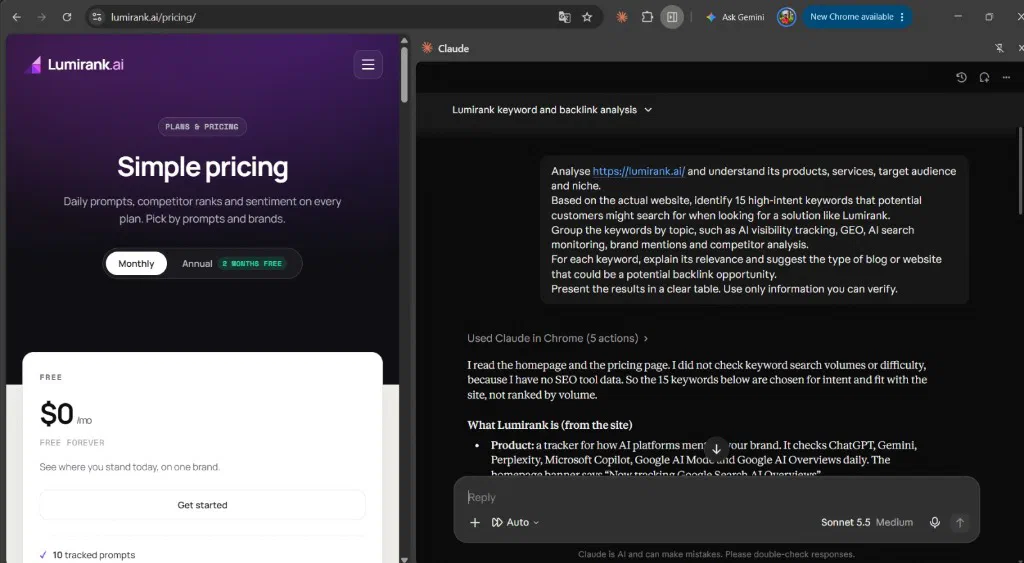
Claude reads the live homepage and pricing page directly on screen. It extracts Lumirank’s verified features: tracking brand visibility across ChatGPT, Gemini, Perplexity, Microsoft Copilot, and Google AI Overviews, while categorizing backlink targets by topical intent. Having Claude ground its analysis in your live pages prevents generic pitches later.
Step 3: Find link-building keywords #
Next, you need search queries that potential customers and industry writers use when researching your space. Effective link building targets pages that already attract relevant traffic: tool roundups, troubleshooting tutorials, and comparison guides.
From the website analysis table, Claude groups high-intent keywords into three distinct editorial buckets:
- Tool Roundups: Queries where authors list and compare software in your niche (such as “best AI visibility tools” or “AI search analytics platforms”).
- Educational Guides: Informational searches where bloggers write tutorials explaining problems your product solves (such as “GEO vs SEO” or “how to track ChatGPT brand mentions”).
- Competitor Alternatives: Searches comparing existing category leaders.
Claude notes upfront that it evaluates semantic fit and buyer intent rather than estimated search volumes, identifying queries where third-party publishers actively write and update resource guides.
Step 4: Find relevant websites #
Open a new Chrome tab, go to Google, and search for one of the identified queries, such as "Best AI Visibility tools".
Rather than clicking through dozens of links manually, open the Claude side panel and instruct Claude to research the live search results:
Analyse the Google search results currently open for "best AI visibility tools".
I am researching potential backlink opportunities for https://lumirank.ai/.
Identify relevant blogs and websites from the search results that could be approached for:
- A mention or inclusion in an existing article.
- A relevant editorial link.
- A guest post contribution.
Visit the most relevant results and assess why each website would be a suitable prospect.
Present the website name, URL, relevant article and suggested outreach opportunity in a table.
Use actual websites and verified information. Do not invent prospects or contact details.
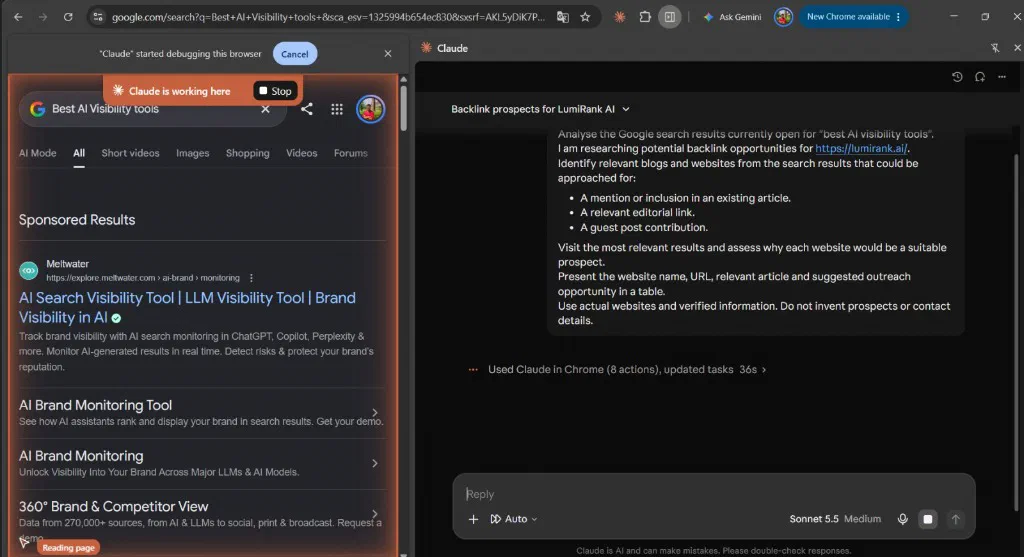
Chrome displays a banner confirming "Claude" started debugging this browser alongside an orange status indicator reading Claude is working here. Claude visits candidate pages in temporary tabs, reading their content in real time.
After completing its analysis across 15 automated browser actions, Claude delivers an objective breakdown:
I visited six of the results and found one strong prospect (Zapier), two weaker ones, and three that are poor fits because they are competitors' own sites. Lumirank isn't listed in any of the articles I read. All six are "best AI visibility tools" roundups, so each is a candidate for an inclusion pitch.
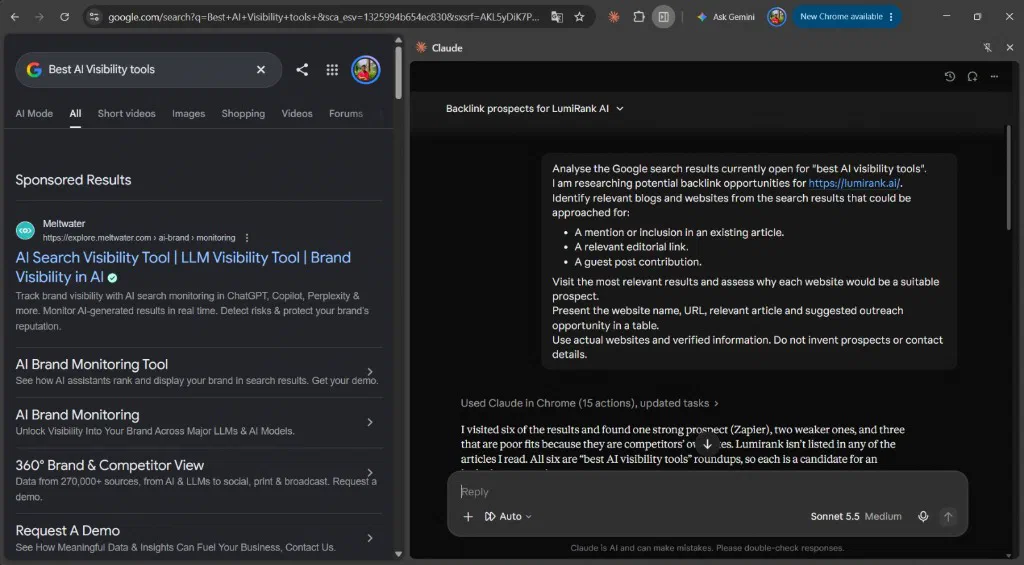
Claude filters out vendor-owned competitor blogs so you can skip them, while highlighting authoritative independent publications like Zapier that welcome tool suggestions becuase their readers look for practical workflow recommendations.
Step 5: Find contact information #
Once you shortlist an independent publication, navigate to their site in Chrome (for our test, zapier.com/ai). You need to identify the right submission channel or editorial contact.
In the Claude side panel, run this extraction prompt:
Research the website currently open in Chrome as a potential link-building prospect for https://lumirank.ai/.
Find its publicly available editorial or business contact details. Check whether it accepts guest posts or has existing articles where Lumirank could be a relevant resource.
Then draft a short, personalised outreach email proposing the most appropriate collaboration opportunity.
Mention a specific article or topic from the website to make the email relevant.
Keep the tone natural and professional.
Do not invent email addresses or send the email. Show me the draft for review.
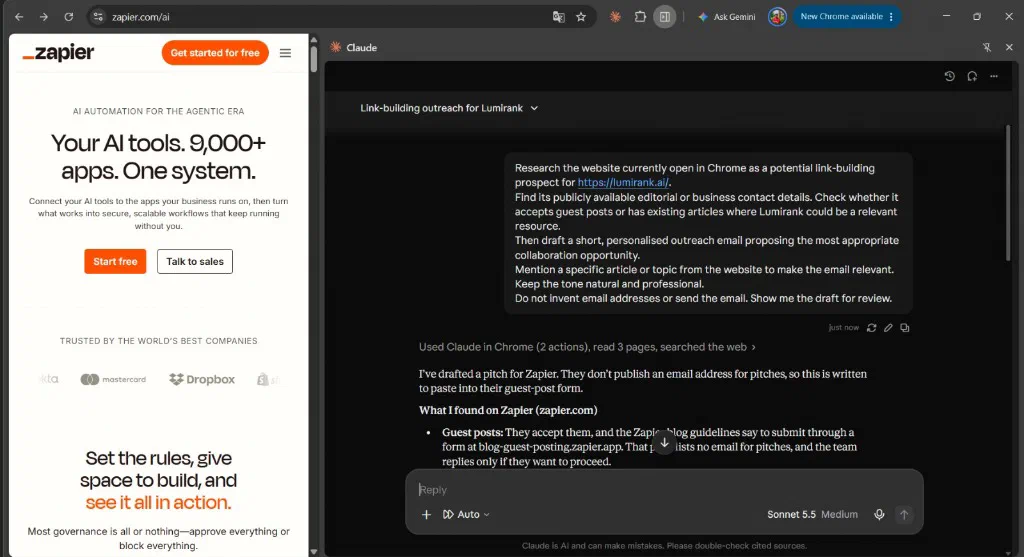
Claude inspects the site, reads three related pages, and flags a crucial operational detail:
“They don’t publish an email address for pitches, so this is written to paste into their guest-post form. What I found on Zapier: They accept guest posts, and the Zapier blog guidelines say to submit through a form at blog-guest-posting.zapier.app. That page lists no email for pitches, and the team replies only if they want to proceed.”
By discovering the exact submission channel, Claude prevents you from sending cold emails to unmonitored general inboxes.
Step 6: Automate outreach with personalised drafts #
With your prospect vetted and the correct submission channel identified, use Claude to generate tailored pitches. High-converting outreach depends on matching the angle to the publication’s editorial format.
Pitching a brand mention #
When reaching out to an existing roundup that covers your category, suggest your product as a complementary addition:
Draft a concise outreach pitch (under 120 words) for the editorial team regarding their roundup "Best AI Visibility Tools".

Rules:
1. Reference a specific concept or tool category from their actual article.
2. Introduce Lumirank briefly as a daily visibility tracker across ChatGPT, Perplexity, and Gemini.
3. Highlight one unique feature that complements their current list (for example, daily prompt sentiment scoring).
4. Ask if they would consider including Lumirank in their next article update.
5. Keep the tone professional, friendly, and low pressure.
Proposing a content-driven link exchange #
If your site publishes original industry research or benchmarking studies, you can propose a link exchange where each party cites a genuinely relevant resource.
However, be mindful of search engine guidelines. Google Search Central link spam policies strictly caution against excessive, artificial reciprocal link schemes. Exchanging links purely to manipulate rankings can trigger algorithmic neutralization by SpamBrain. Only propose exchanges where both links are editorially justified, contextually relevant, and add real value for human readers.
Sponsoring a paid link placement #
Some publications monetize their resource lists through sponsored inclusions. If you explore paid placements, Google’s guidelines require clear qualification:
- Commercial links, paid reviews, and advertorials must use the
rel="sponsored"orrel="nofollow"attribute in their HTML. - Passing PageRank credit through uncredited paid links violates search engine policies and risks manual penalties.
- Ask Claude to draft a polite inquiry asking about their sponsored content options while explicitly requesting proper disclosure.
Pitching a guest contribution #
When pitching an authoritative blog like Zapier, use Claude to craft a structured pitch tailored to their submission criteria:
Review the target publication's guest post guidelines on this open tab.
Propose three guest article concepts that explain generative search visibility for their audience.

For each concept, provide:
1. Working Title.
2. 2-sentence summary of the core practical argument.
3. Why this article helps their readership without reading like a promotional advertisement.
Select the best topic, review Claude’s pitch draft, and submit it directly through their verified contributor form.
Step 7: Manage replies and follow-ups #
Link building does not end when you submit the initial pitch. Most placements require organized tracking and timely follow-ups.
When an editor responds, paste their reply into the Claude side panel:
Here is the reply from the editor:
"[Paste reply text]"

Analyze their response:
1. Categorize sentiment: Positive, Interested with conditions, Fee requested, or Declined.
2. Outline recommended next steps.
3. Draft a concise reply addressing their questions or confirming publication details.
If an editor does not respond within five to seven business days, use Claude to draft a polite follow-up:
Draft a short follow-up message (under 60 words) to the editor regarding our previous pitch.
Be polite, keep it brief, and offer a quick one-sentence reminder of why this topic is timely for their readers.
Keep your follow-ups limited to one or two polite messages. Pestering editors damages relationships and increases the likelihood that your domain will recieve a spam block.
Operational boundaries: What Claude can and cannot do #
Understanding Claude’s limits protects your brand reputation:
- What Claude handles well: Reviewing live pages, generating relevant keywords, vetting topical fit, extracting visible contact details, and drafting custom pitch copy.
- What still requires human action: Evaluating overall domain trust, verifying email deliverability, negotiating terms, reviewing every pitch draft, and submitting messages.
- No background spam: Claude in Chrome does not run unattended headless scrapers or blast automated email sequences while your laptop is closed. It is an interactive research assistant that speeds up human-directed workflows.
Never promise guaranteed backlinks or overnight ranking boosts to your team. Sustainable link building depends on providing genuine editorial value that site owners want to share.
Conclusion #
Using Claude in Chrome turns link building from a frustrating numbers game into a structured, high-context workflow. By analyzing your product positioning, discovering ranking articles on Google, and extracting verified editorial contacts in real time, you create pitches that respect editors’ time and earn authentic mentions.
High-quality backlinks and brand citations do more than boost traditional search engine rankings. As search habits expand toward generative engines, AI models like ChatGPT, Perplexity, and Gemini frequently cite authoritative niche publications when recommending software. Independent platforms like Lumirank help marketing teams track how often AI engines recommend their brand, identify earned media citations, and monitor prompt visibility alongside classic SEO metrics.
Frequently asked questions #
Does Claude in Chrome send outreach emails automatically? #
No. Claude in Chrome operates as an in-browser copilot. It reads active web pages and drafts personalized email copy in the side panel, but you must review the draft, verify details, and send the message manually from your email client.
Which Claude subscription do I need for Claude in Chrome? #
Claude in Chrome is available exclusively on paid Anthropic subscriptions, including Claude Pro, Max, Team, and Enterprise plans. It is not supported on free tiers or mobile browsers.
Are paid link placements and link exchanges compliant with Google policies? #
Google Search Central policies state that any link created as part of a financial transaction, sponsorship, or commercial exchange must include rel="sponsored" or rel="nofollow". Excessive reciprocal exchanges designed purely to pass ranking credit violate link spam guidelines.
Can Claude guarantee backlinks or higher search rankings? #
No. Link acquisition depends on editorial approval, domain relevance, and content quality. Claude speeds up research and email personalization, but no AI tool can guarantee backlinks or ranking improvements.