When buyers ask AI assistants for recommendations, discovery skips standard search result pages. Buyers receive synthesized shortlists and follow citation links with high commercial intent.
Standard analytics bury these visits in generic referral tables, Google blends AI Overview clicks into general search, and zero-click answers hide behind direct visits. Tracking AI search requires monitoring visible referrals in Google Analytics 4 alongside upstream citations across models.
In short
- AI platforms pass distinct referral signatures in GA4. ChatGPT, Perplexity, and Copilot can be isolated with regex filters and custom channels.
- AI search visitors convert at higher rates. Generative answers pre-qualify user intent before the click.
- Google Search Console blends AI Overviews. Clicks from AI Overviews are combined directly into standard Google search reports.
- Much of AI discovery is dark traffic. Users evaluate recommendations and visit later via direct navigation or branded queries.
- Web analytics track only downstream clicks. Complete measurement requires monitoring upstream prompt visibility and citations with tools like Lumirank.
Understanding AI Search Traffic #
Generative engines use Retrieval-Augmented Generation (RAG) to build answers. As detailed in traditional SEO vs GEO and AEO, engines query web indexes and synthesize answers directly in the prompt.
When a user asks ChatGPT or Perplexity for software recommendations, the engine cites relevant sources. The user then takes three paths:
- Direct citation click: The user follows the link to inspect pricing or features.
- Zero-click brand assist: The user notes the brand and navigates directly later.
- Secondary search: The user searches the brand name on Google to read reviews.
Direct clicks pass referral data into analytics. The remaining paths register as direct traffic or branded organic search.
Using Google Analytics 4 to Track AI Referrals #
Google Analytics 4 assigns visits from ChatGPT, Perplexity, and Copilot to the generic Referral channel by default.
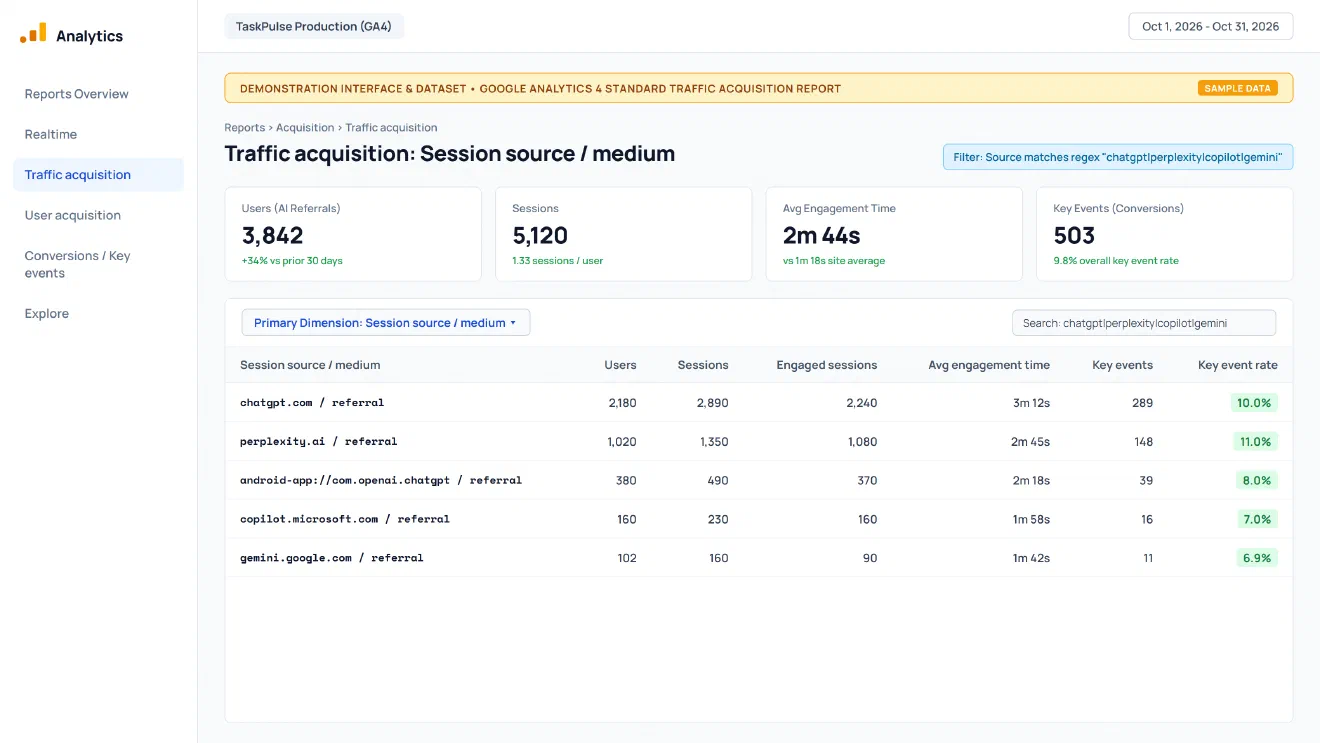
To isolate this traffic, open Reports -> Acquisition -> Traffic acquisition, set the primary dimension to Session source / medium, and filter with this regex:
chatgpt\.com|perplexity\.ai|copilot\.microsoft\.com|gemini\.google\.com|claude\.ai|android-app:\/\/com\.openai\.chatgpt
Desktop browsers pass hostnames like chatgpt.com / referral. Mobile apps pass schemes like android-app://com.openai.chatgpt / referral or drop to (direct) / (none).
Under Admin -> Data display -> Channel groups, build an AI Search custom channel matching Session source to the regex above and Session medium to referral.
Tracking Conversions and Key Events #
In GA4, business outcomes like demo bookings and trial sign-ups are tracked as Key events.
AI search visitors rarely land on introductory blog posts. Because models answer general questions directly, visitors follow citation links straight to feature pages and pricing tables.
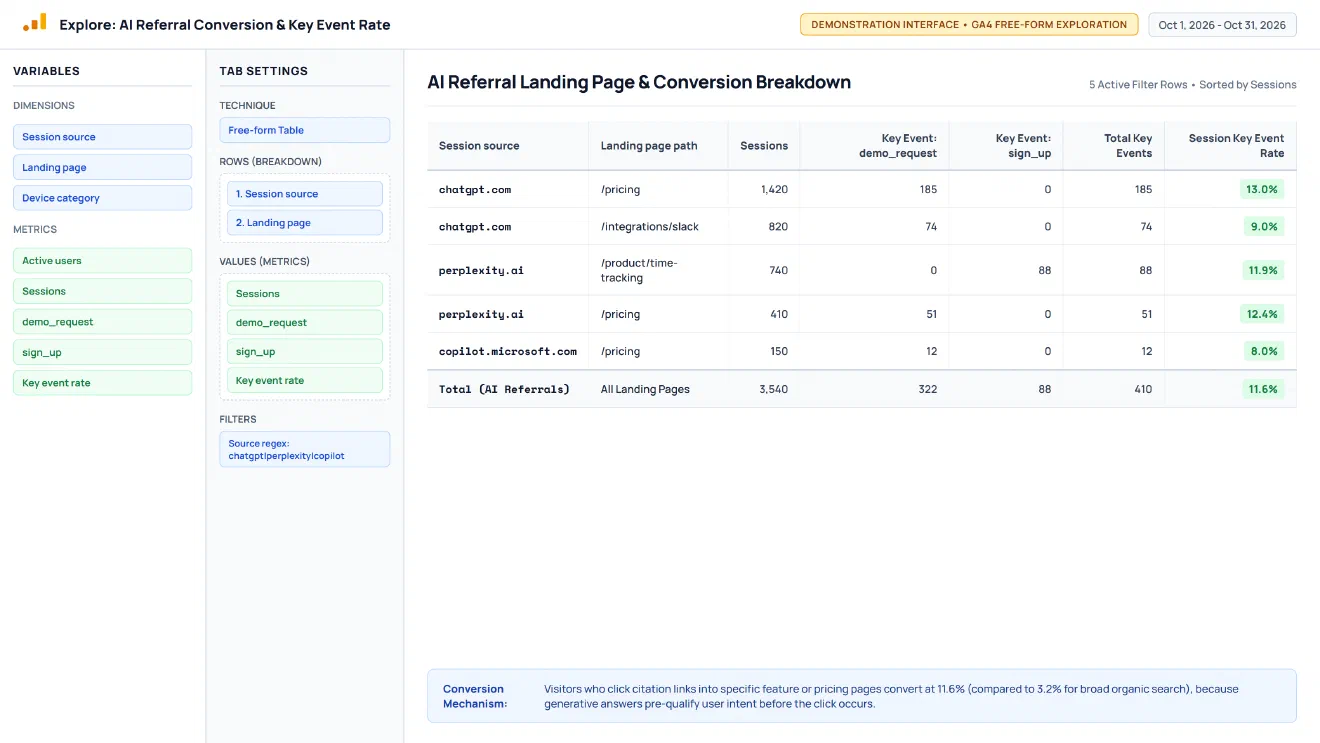
To measure conversion efficiency, create a Free-form Exploration in Explore. Add Session source and Landing page to Rows, add Sessions, Key events (demo_request), and Session key event rate to Values, and filter Session source for AI referrers.
In the demonstration data, visitors landing on /pricing from chatgpt.com convert at 13.0% for demo requests (versus 3.8% for organic search). Perplexity visitors arriving on feature pages convert at 11.9% because the model pre-qualified their needs.
What Google Search Console Can and Cannot Tell Us #
Google Search Central documentation on AI Overviews defines Search Console’s limits:
- What GSC reports: Combined search impressions and clicks, conversational query triggers, and page trends.
- What GSC omits: GSC lacks a seperate filter to isolate AI Overview clicks from standard results, offering no reporting for ChatGPT or Perplexity.
- Zero-click citations: If an AI Overview quotes your site without a click, GSC records an impression only if the link enters the viewport.
Use Search Console to track broad search health rather than as a standalone AI analytics tool.
UTM Parameters and the Attribution Gap #
UTM parameters work only when you control the published destination, such as custom GPT actions (?utm_source=chatgpt&utm_medium=custom-gpt) or directory links.
When engines crawl sites through RAG pipelines, they index canonical URLs without campaign tags. Forcing UTM redirects harms crawlability and indexing.
Much of AI discovery represents dark traffic. A user reads an AI recommendation and visits later via direct navigation or branded search. GA4 credits those conversions to (direct) / (none) or organic search. To capture this influence, add an attribution field to forms: How did you hear about us?
Comparison of Search Discovery Channels #
| Channel | GA4 Identification | Funnel Stage | Click Intent | Attribution Completeness |
|---|---|---|---|---|
| Traditional Organic Search | google / organic | Top / Mid | Exploring candidate links | High (Full tracking in GA4 & GSC) |
| AI Platform Referral | chatgpt.com / referral | Mid / Bottom | Verifying pricing, specs, or signing up | Moderate (Misses in-app browser drops) |
| Google AI Overview | google / organic | Commercial | Researching a sub-topic | Low (Blended with search in GSC) |
| Dark AI Discovery | (direct) / (none) | Bottom | Returning to buy after reading AI advice | Zero (Hidden in direct/branded search) |
Measuring Beyond Website Visits With Lumirank #
Web analytics record only visitors reaching your site, missing zero-click answers. Complete tracking requires monitoring upstream metrics: brand mention rate, position prominence, citation frequency, and share of voice.
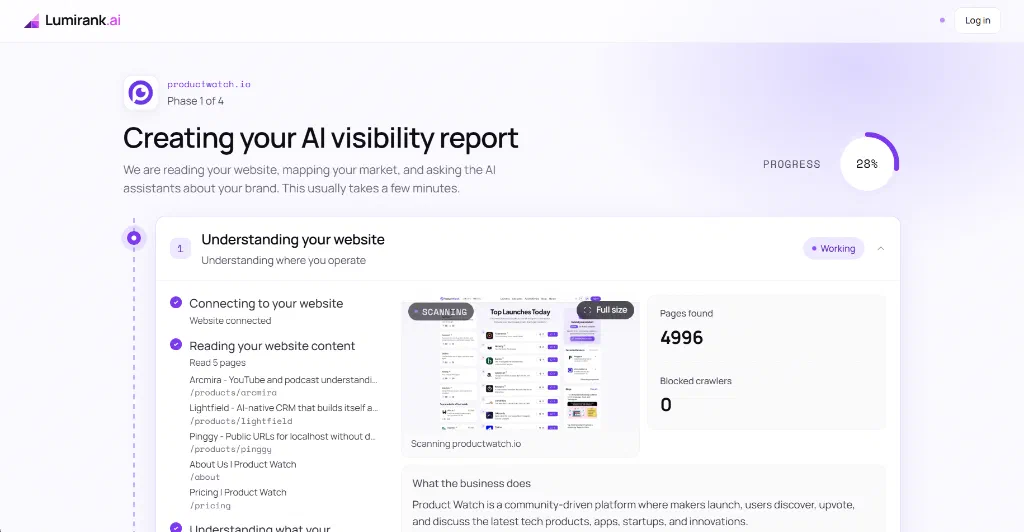
Platforms like Lumirank automate this monitoring across ChatGPT, Gemini, Perplexity, Copilot, and Google AI Overviews on a 0 to 100 index. The audit begins by scanning site architecture and crawler permissions (shown above for productwatch.io, indexing 4,996 pages with zero crawler blocks).
Next, the platform queries buyer prompts to track visibility, average rank, and brand prominence over time.
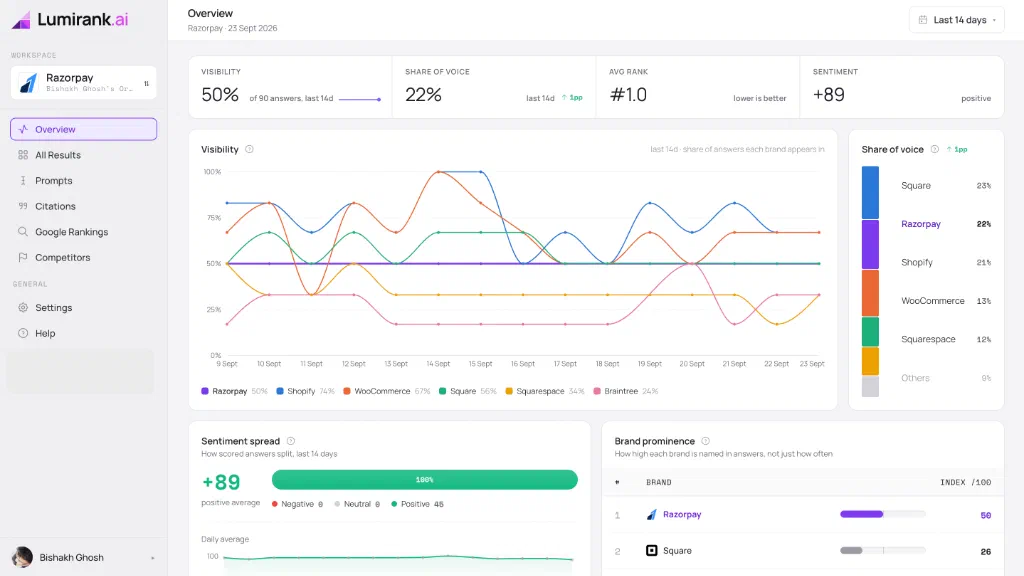
Above, Lumirank tracks 90 category answers for Razorpay, recording 50% visibility, 22% share of voice, and a #1.0 average rank with +89 sentiment against Square and Shopify.
Finally, teams must track where generative engines source facts.
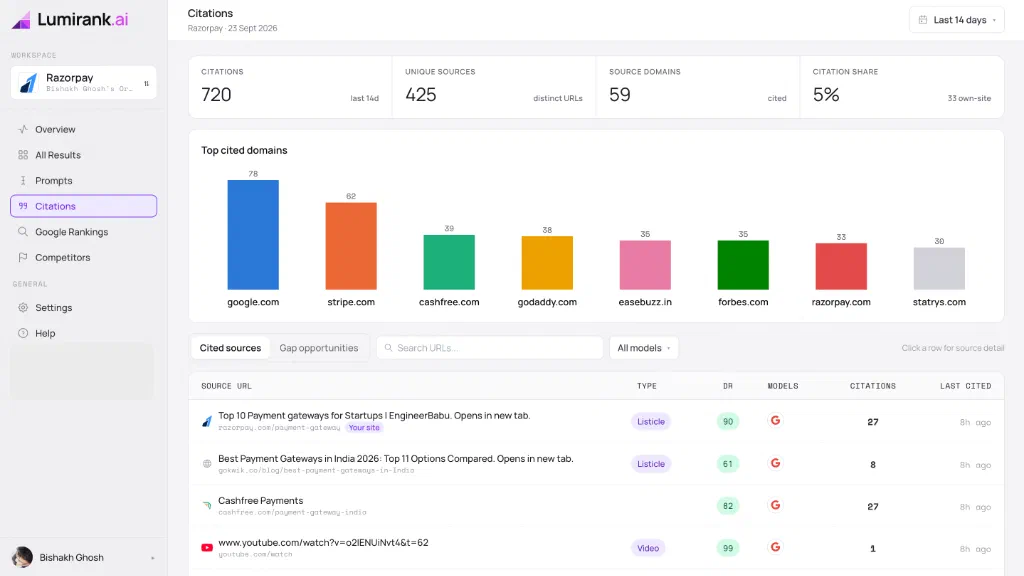
Above, Lumirank maps 720 citations across 59 domains, revealing whether competitors recieve citations from third-party sources your site lacks. Lumirank tracks model visibility, while GA4 measures downstream visits.
A Practical Measurement Workflow #
Follow this 6-step framework to set up an AI search measurement system:
- Configure GA4 referral tracking: Set up an AI Search channel group and an Exploration for key events.
- Establish a referral baseline: Measure monthly visits, engagement time, and conversion rates from AI platforms.
- Audit cited landing pages: Check pages cited most and confirm that pricing and CTAs are prominent.
- Monitor direct and branded lifts: Correlate visibility shifts with direct traffic and branded queries in Search Console.
- Track upstream visibility: Use Lumirank to track brand mentions, prominence, and sentiment across prompt clusters.
- Bridge citation gaps: Identify sources cited for competitors and earn brand inclusion on those domains.
Frequently Asked Questions #
How does AI search traffic appear in Google Analytics 4? #
Visits arrive as Session source / medium referrals, while mobile apps may show package schemes like android-app://com.openai.chatgpt.
Does Google Search Console report clicks from Google AI Overviews separately? #
No. GSC blends AI Overview clicks directly into standard search performance without a dedicated filter.
Why do AI search visitors convert at higher rates? #
Generative answers pre-qualify intent. Visitors clicking citations have already vetted features and pricing.
What is dark AI search traffic? #
Dark AI search occurs when a user discovers a brand in an AI answer and visits later via direct navigation or branded search.
Conclusion #
Measuring AI search requires recognizing that discovery is split in two. A portion of buyers follows citations into web analytics, while others absorb AI answers and convert later through direct visits or branded search.
Relying solely on last-click analytics overlooks the models shaping buyer decisions. By isolating AI referrers in GA4, benchmarking conversions, and tracking upstream brand mentions with visibility tools, you can accurately measure your return on Generative Engine Optimization.